Dev Unit 5: Building Your AI Workflow System
From ad-hoc AI to systematic workflows
What We'll Cover Today
What You Should Be Able to DO After Today
Today we build a complete workflow system, not just learn individual techniques.
The Throughline: Building a Stack
Each block builds on the previous:
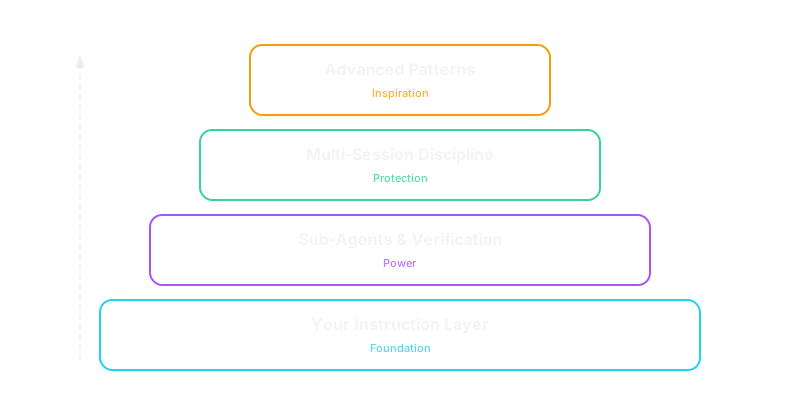
Your Instruction Layer

Block 1
The Foundation
What is an Instruction File?
A markdown file that shapes AI behavior for your project.
- CLAUDE.md — always loaded, shapes every interaction
- Process docs — on-demand workflows in
ai/instructions/ - Skills — one-command shortcuts in
.claude/skills/
Why Instruction Files Beat Ad-Hoc Prompting
| Ad-Hoc Prompting | Instruction Files |
|---|---|
| Inconsistent results | Repeatable outcomes |
| Hard to remember details | Written down once |
| No version history | Refinable over time |
| Solo knowledge | Shareable with team |
| Reinvent each time | Build on what works |
Instruction files are the highest-leverage thing you can create — one well-written CLAUDE.md influences hundreds of future interactions.
Anatomy of a Good CLAUDE.md
# Project Context
[What this project is, who it's for]

## Critical Files to Review
- context.md — project knowledge base
- PRD — requirements source of truth
- Architecture — system design decisions

## Behavioral Guidelines
- Keep solutions simple and focused on requirements
- Ask for expert opinion before making changes
- Don't add features not in the PRD
- Change code as if it was always this way (no compatibility layers)

## Code Style
[Patterns, naming conventions, testing expectations]
The Behavioral Guidelines Section
This is where you prevent pitfalls before they happen:
## Behavioral Guidelines
- Keep solutions simple and focused on requirements
- Don't add features not in the PRD
- Ask for expert opinion before making changes
- Change code as if it was always this way (no compatibility layers)
- Don't over-engineer — we can add complexity later
- This is MVP only. Additional features go in future roadmaps.
Over-engineering? Scope creep? Compatibility layers nobody asked for?
The Progression: Ad-Hoc → Codify → Automate
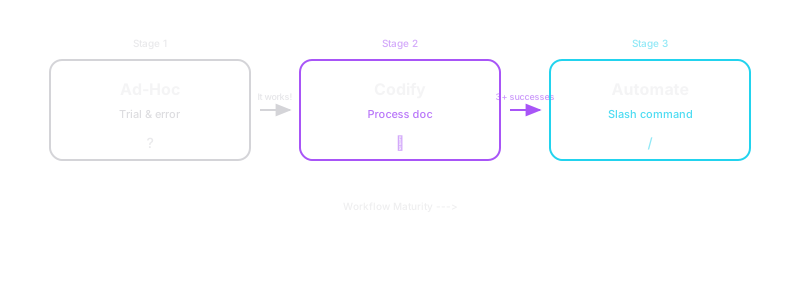
This is how every expert-level workflow starts. Nobody designs the perfect process upfront.
A process document is a founding hypothesis for a workflow. Running it 3+ times is the cheap loop that tests it — same methodology Jason taught for business hypotheses.
Anatomy of a Process Document
# Instruction: PR Review

## Context
- Read aiDocs/context.md
- Review the PRD for requirements alignment
- Check aiDocs/coding-style.md for conventions

## Workflow
1. Run git diff to see all changes
2. Review each changed file for correctness, style, and security
3. Check for missing tests
4. Check for scope creep beyond the roadmap
5. Report findings with severity (critical / suggestion / nit)

## Success Criteria
- [ ] All changes reviewed
- [ ] No critical issues remaining
- [ ] Tests cover new functionality

## Behavioral Guidelines
- Report findings before making any changes
- Don't fix things without asking first
Skills & Slash Commands
Skills are SKILL.md files in .claude/skills/ — NOT in CLAUDE.md.
.claude/skills/
  pr-review/SKILL.md          ← defines /pr-review
  create-roadmap/SKILL.md     ← defines /create-roadmap
  frenemy-pragmatic/SKILL.md  ← defines /frenemy-pragmatic
Each SKILL.md = YAML frontmatter (name, description) + markdown instructions. Claude auto-discovers them.
| Skill | Purpose |
|---|---|
/create-roadmap | Generate plan + roadmap from requirements |
/implement | Execute a roadmap in fresh session |
/pr-review | Review uncommitted code |
/verify | Sub-agent verification of implementation |
Promote after 3+ successful uses. Don't automate what you're still refining.
Cursor’s Approach
No SKILL.md equivalent, but similar results:
.cursorrules— project-level instructions (like CLAUDE.md)- Notepad entries — reusable prompt templates you can reference
- @-mentions — pull specific files/docs into context on demand
- Composer rules — workflow-specific instructions per session
"In Practice" — Real Skills in Action
Demo: /frenemy-pragmatic
A mature automated skill:
- Launches a frenemy sub-agent to critically analyze your work
- A pragmatic intermediary synthesizes: what's right, what's wrong, what to actually do
- Returns actionable recommendations
Demo: /roadmap → /implement-roadmap
The full planning-to-execution pipeline as skills.
Inside a Real Skill: The Frenemy

How the Frenemy Works
disable-model-invocation = the skill is the prompt. Frenemy-pragmatic deploys frenemy as a sub-agent, then synthesizes. Simple skills compose into powerful workflows.
- frenemy = direct prompt injection — Claude doesn’t interpret it, just prepends the adversarial instructions
- frenemy-pragmatic = orchestration — launches frenemy as an independent sub-agent, then acts as a pragmatic intermediary
- This is the supervisor-worker pattern from Block 2, implemented as composable skills
Jason’s Lecture 2 connection: The frenemy is falsifiability automated — “What would need to be true for this to be false?” turned into an adversarial reviewer that forces you to prove your reasoning before you ship it.
Token Budget Note
Instruction files are essentially free — loaded as context, negligible cost.
Sub-agents are expensive — 3-5x token multiplier (we'll cover this next).
Get your CLAUDE.md right before spending tokens on multi-agent workflows.
Sub-Agents & Verification

Block 2
The Power Layer
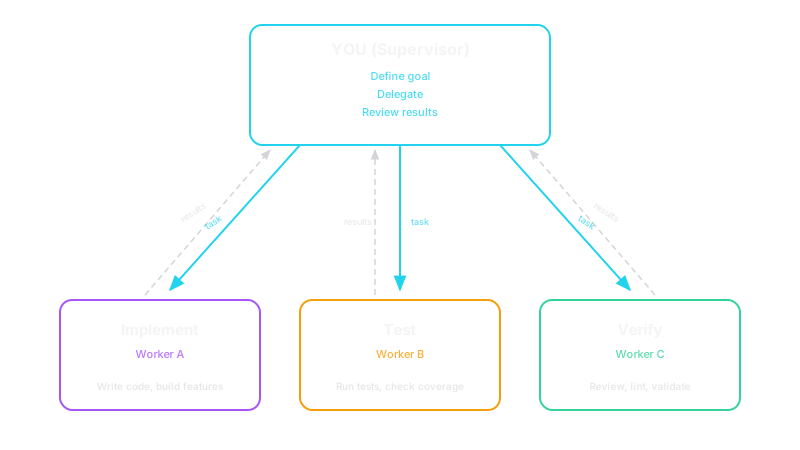
The Supervisor-Worker Pattern
In Units 7-8, you built agents that use tools to accomplish goals.
Now flip the perspective: YOU are the supervisor agent. AI sessions are your workers.
The Verification Cycle

"Deploy a sub-agent to implement what we just discussed."
    → [Sub-agent implements]
"Now deploy another sub-agent to verify we got it right."
    → Almost always finds at least one issue
"Deploy another sub-agent to verify from a different angle."
    → Often still finds something the first missed
Nothing is 100% — but you get very close.
The Law of Witnesses
"In the mouth of two or three witnesses shall every word be established"
Applied to AI verification:
- Different AI sessions hallucinate independently
- Agreement across independent sessions = high confidence
- Disagreement = investigate
| Risk Level | Witnesses | Method |
|---|---|---|
| Low (routine code) | 1 | Single AI session |
| Medium (important feature) | 2 | 2 sessions or 2 models |
| High (security-critical) | 3+ | Multiple sessions + tests + human review |
Example: Team building a healthcare app — one agent reviews for correctness, a separate agent reviews for data privacy compliance. They don't share context. That's the point.
The Token Tax — Real Numbers
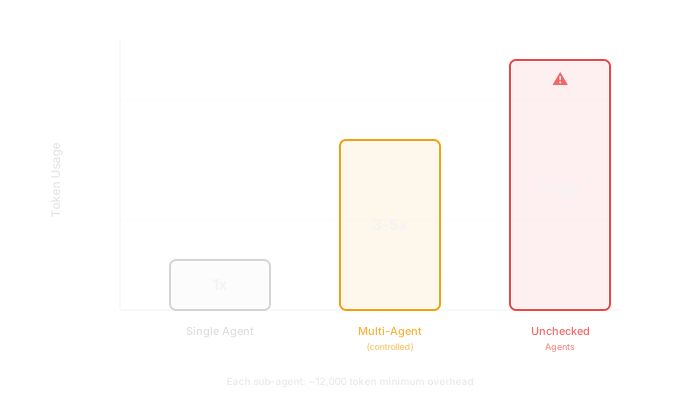
Why It Costs More
- Each sub-agent gets its own system prompt + project context (re-sent every call)
- "Communication tax" — agents restate goals and results to each other
- Context replay — each tool call replays the entire conversation
Budget-Conscious Patterns
On Pro plans ($20/month):
- Limited messages per 5-hour window
- Supervisor + 2 sub-agents ≈ 4-8 messages per verification cycle
- You'll hit limits quickly if aggressive with sub-agents
Practical strategies:
- Fewer, specialized agents > many generic agents (40-60% savings)
- Use sub-agents for high-stakes verification, not routine tasks
- Instruction files are free — optimize the cheap layer first
- Start manual, automate only when the pattern is proven
"In Practice" — The Verification Cycle
Live Demo
- Ask AI to implement a small feature
- Deploy sub-agent to verify
- Sub-agent finds an issue (they almost always do)
- Fix the issue
- Deploy another sub-agent to verify from a different angle
- Clean result
Multi-Session Discipline
Block 3
Survival Skills for Final Projects
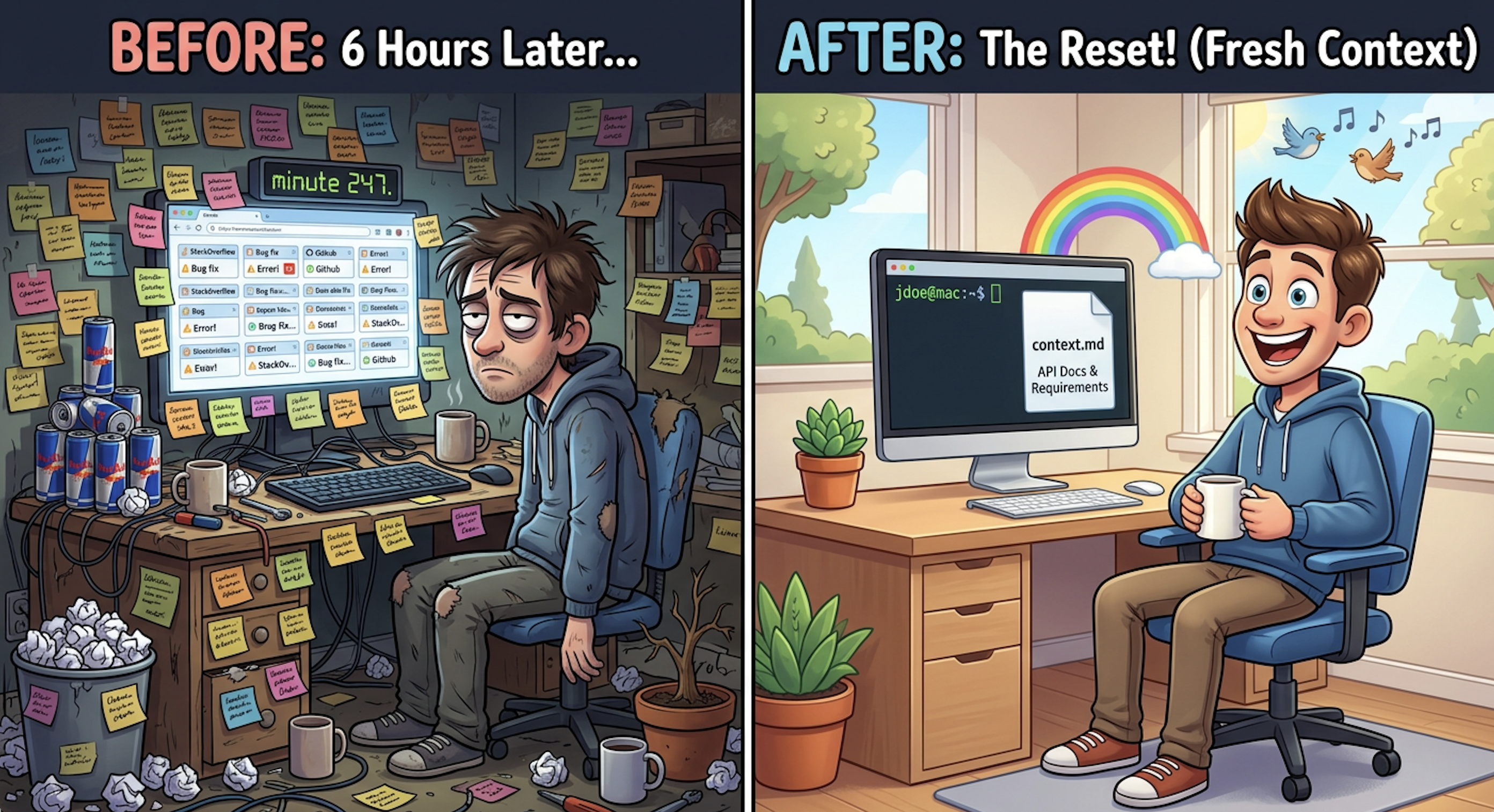
Context Pollution — The Silent Killer
What it is: Old conversation details confuse current work.
Signs you're polluted:
- Conversation has been going 30+ minutes
- AI seems confused about current goals
- You've pivoted direction significantly
- Previous approaches failed multiple times
Bounded rationality made visible: AI can only reason about what's in its context window. Polluted context = rationality bounded by garbage. Fresh session resets the bounds.
The Three-Session Pattern
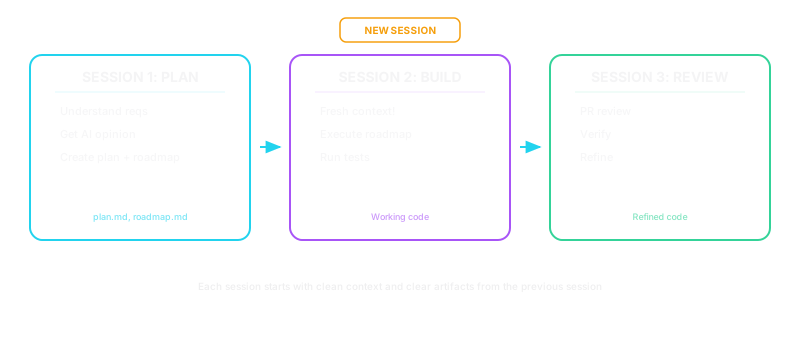
Why separate sessions?
- Planning context ≠ implementing context (different mental modes)
- Implementation starts clean — only reads plan documents
- Review provides genuinely fresh perspective
Three-Session Prompts
Planning session:
Review aiDocs/context.md. Here's what we need to build:
[requirements]. Give me your expert opinion first.
Don't make any changes yet.
Implementation session (NEW session):
Review aiDocs/context.md. Then implement the work described in:
- ai/roadmaps/[date]_feature_plan.md
- ai/roadmaps/[date]_feature_roadmap.md
Check tasks off as you complete them. Run tests after each step.
Review session:
We just completed implementation. Please do a PR review of all
uncommitted changes. Report findings before making any changes.
For final projects: Every major feature should follow this pattern.
The Escalation Ladder
When AI gets stuck — use in order:
| Level | Action | When to Escalate |
|---|---|---|
| 1 | Re-prompt with more context | After 2 failed re-prompts |
| 2 | Fresh session with context.md | If fresh session also gets stuck |
| 3 | Sub-agent review to diagnose | If sub-agent doesn't find clear fix |
| 4 | Manual intervention — you fix it | Last resort |
Unit 3.5 callback: You already know Levels 1 and 4. Today adds Levels 2 and 3.
Pitfall Prevention
| Pitfall | Why | Fix |
|---|---|---|
| Over-engineering | AI adds unrequested features | Behavioral guidelines in CLAUDE.md |
| Scope creep | "While we're at it" grows beyond MVP | "This is MVP only" in every prompt |
When to Put the AI Down
- Deep learning needed — skill erosion is real
- Genuinely novel problem — AI gives confident wrong answers
- Security-critical code — the Confidence Trap (Unit 4)
- Stuck 20+ min — step away, think manually
- Team alignment matters — shared struggle builds shared knowledge
Block 4
Advanced Patterns
What's Possible
The Universal Agent Loop
Every major AI coding tool converges on the same pattern:
- Claude Code: Single-threaded master loop with natural-language TODO list
- Cursor: Same loop, more human-in-the-loop at each step
- Codex-based tools: Same pattern, orchestration varies
You already built this. Units 7-8: think → act → observe → repeat.
When you run /roadmap → /implement-roadmap, you're deliberately running this same loop — but with more control and better verification.
Instruction files (Block 1) are how you program the outer loop.
Inside Real Commands: /roadmap → /implement-roadmap
Claude Code commands (.claude/commands/) — condensed from 135 and 248 lines:
/roadmap — plan then verify:
---
description: Create a plan doc and roadmap doc
  for implementing updates
---
# Roadmap Command
Create a plan doc and concise roadmap doc.
Save under ai/roadmaps/, prefix with date.

## Phase 1: Planning
1. Understand the request
2. Research the codebase
3. Create the plan doc (approach, rationale,
   design decisions)
4. Create the roadmap doc (specific tasks
   with checkboxes)

## Phase 2: Expert Review
Launch a review sub-agent to validate
before implementation:
- Check alignment with codebase reality
- Find over-engineering concerns
- Identify missed opportunities
- Auto-fix factual errors; ask user about
  design changes
/implement-roadmap — orchestrate execution:
---
description: Implement a roadmap using sub-agents
  with progress tracking
---
# Implement Roadmap Command
You are the orchestrating agent.
Sub-agents do the coding.

## Phase 1: Preparation
  Read roadmap, plan, and CLAUDE.md
## Phase 2: Implementation
  Delegate to sub-agents in parallel
## Phase 2.5: Verification
  Launch verification sub-agents
  for high-risk work
## Phase 3: Build & Test
  npm run build, npm test, fix failures
## Phase 4: PR Review
  Review everything, fix minor issues,
  escalate drift
## Phase 5: Archive
  Move to complete/, update changelog, commit

Key principle: You orchestrate,
sub-agents implement. Never skip Phase 5.
/roadmap & /implement-roadmap — Full Definitions
Full command files — scroll to read, copy from slide source or course repo.
Playwright + Persona UX Review
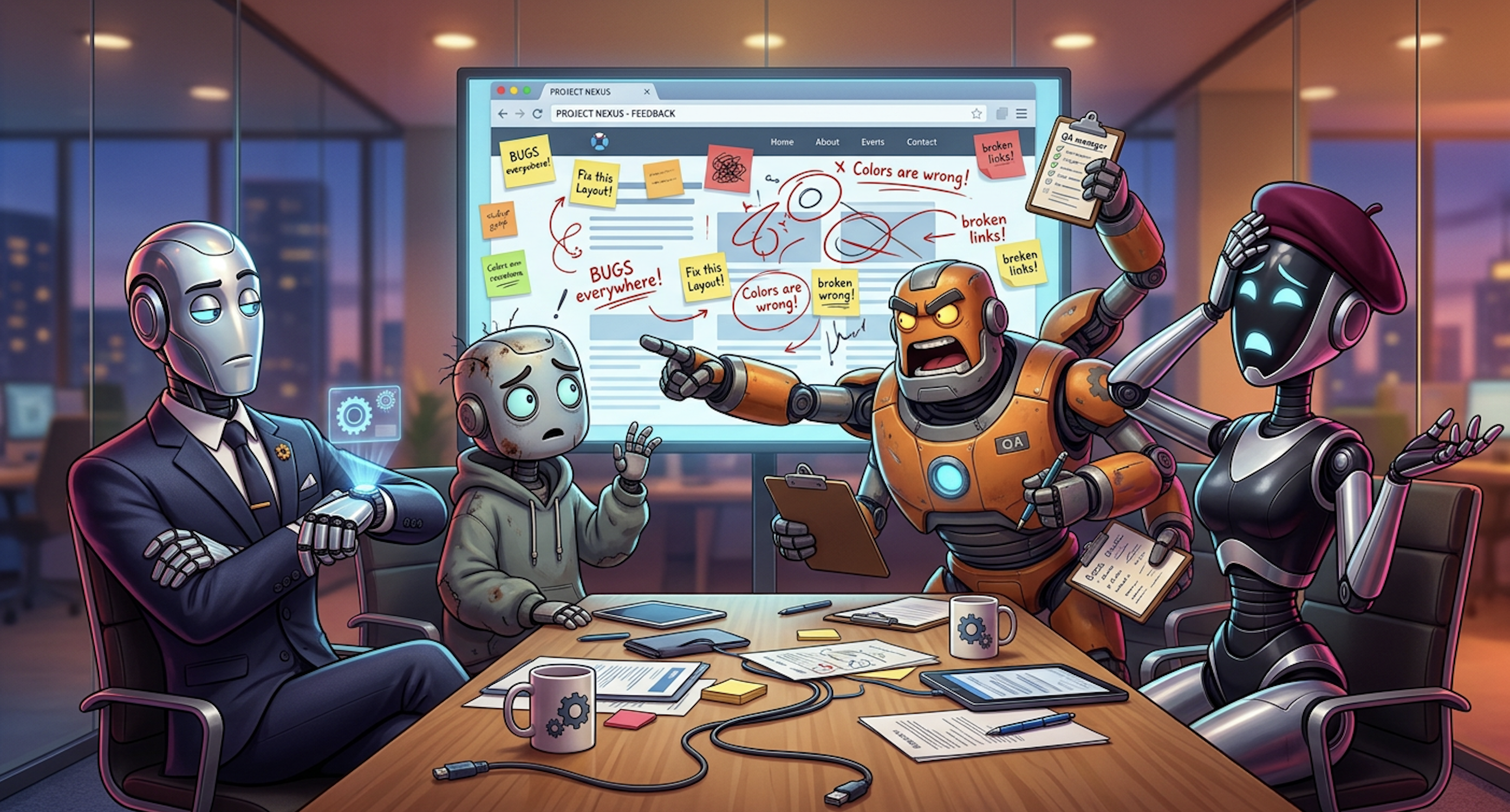
| Persona | Role | Focus |
|---|---|---|
| Sarah | VP of Engineering | Time-to-value, adoption |
| Jake | Junior Developer | Onboarding, confusion |
| Marcus | QA Manager | Evidence quality, data trust |
| Mei | UX Designer | Visual hierarchy, consistency |
Workflow: Launch personas in parallel → each navigates live UI → structured reviews → consensus matrix (3/5 agree = real) → frenemy reviews feasibility
Git Worktrees — What They Are

A second working directory tied to the same repo, on a different branch. No switching. No stashing.
git worktree add ../project-feature-B feature-B
# Now: project/ (feature-A) + project-feature-B/ (feature-B)
Each directory is a full checkout — separate terminals, separate AI sessions. Clean up: git worktree remove ../project-feature-B
AI + Worktrees — The Pattern
Instead of waiting for one AI agent to finish:
Terminal 1: project/              ← You + AI on feature A
Terminal 2: project-feature-B/    ← Separate AI session on feature B
Terminal 3: project-hotfix/       ← Another AI session on a quick fix
Claude Code supports this natively with the --worktree flag — creates the worktree and launches an agent session in it automatically.
AI handles merges well — it reads changelogs, commit messages, and roadmaps to understand the intent behind changes, not just the diff.
Worktrees — When to Use vs. Skip
Use when:
- Tasks are independent (different files, different features)
- You're blocked waiting for one agent and want to stay productive
- You need a clean directory for a verification agent without touching your working state
- You have the token budget for parallel sessions
Skip when:
- Tasks overlap the same files heavily (merge pain > parallelism gain)
- You're on Pro with limited messages remaining
- The feature is small enough for one session
Your Workflow Cheat Sheet
Connecting to Final Projects
This Lecture Maps to Your Grade
Casey's technical grading (45%):
| Grading Area | Today's Lecture |
|---|---|
| AI development infrastructure | CLAUDE.md, instruction files, project structure |
| Phase-by-phase implementation | Multi-session workflows, roadmap execution |
| Debugging discipline | Escalation ladder, systematic troubleshooting (logging was Unit 4) |
| Process documentation | Evidence of systematic AI workflow |
Quick Reference Card
INSTRUCTION FILES               SUB-AGENTS & VERIFICATION
=================               ==========================
CLAUDE.md    → Always loaded    Pattern  → You supervise, agents execute
ai/instruc./ → On demand        Witness  → Match count to risk (1/2/3+)
Slash cmds   → After 3+ uses    Cost     → 3-5x normal (controlled)
Progression  → Ad-hoc →         Budget   → Specialized > generic
               Codify →                    (40-60% savings)
               Automate

MULTI-SESSION                   ESCALATION LADDER
=============                   =================
Session 1: Plan → plan.md      1. Re-prompt with context
Session 2: Build → code        2. Fresh session + context.md
  (FRESH context!)              3. Sub-agent review
Session 3: Review → refined    4. Manual intervention
Golden rule: when in doubt,
  fresh session                 WHEN TO STOP USING AI
                                =====================
PITFALL PREVENTION              1. Deep learning needed
==================              2. Genuinely novel problem
Over-engineering → CLAUDE.md    3. Security-critical code
Scope creep → PRD reality check 4. Stuck in a loop (20+ min)
Context pollution → fresh       5. Team understanding matters
The Meta-Lesson
Everything follows the same progression:
Dynamic → Codified → Automated
- Experiment with AI dynamically
- Codify what works into a process document
- Automate into a slash command after repeated success
- Build on that automation to create more complex workflows
This applies to every AI tool, every project, every team.
The Forklift, Revisited

- Instruction files = your warehouse layout
- Sub-agents = your fleet
- Multi-session discipline = your logistics plan
- The escalation ladder = your emergency procedures
Together: a system that lets you move faster than anyone carrying boxes by hand.
What You Should Do This Week
Resources
Course connections: Units 1 (ReAct), 2 (PRD/docs), 3 (Frenemy/context.md), 4 (Security/Confidence Trap), 7-8 (Agent architecture). Jason: Systems Thinking, Bias & Rationality, Problem Quality.