
Dev Unit 6: Building AI Agents
From using agents to programming them
What We'll Cover Today
What You Should Be Able to DO After Today
Today you go from using agents to building them. This is where it gets fun.
Part 1
Why Build Agents?
From user to creator
From User to Creator

In previous units, you learned to use AI agents:
- Claude Code and Cursor as pre-built agents
- MCP tools as pre-built extensions
- Sub-agents as pre-built orchestration
Today: You learn to build agents from scratch
Single-Shot → Agent-Powered
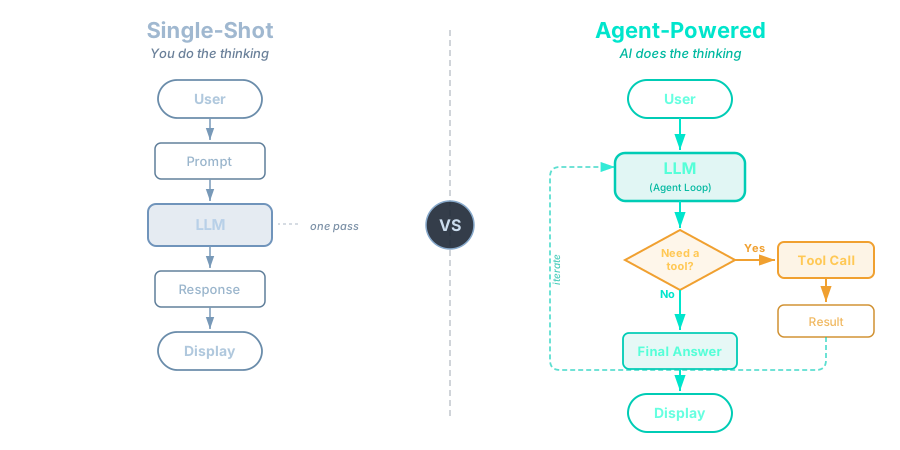
Single-Shot → Agent-Powered
Most apps use AI like this (single-shot):
- One prompt → structured JSON back → display result
- Generate a schedule, extract data from an image, produce an analysis
Today you learn to build AI that does this (agents):
- Decides which tool to use → calls it → reasons about result → decides next step
- A scheduling app: agent calls
check_calendar→find_open_slot→create_block - A data extraction app: agent retrieves similar records to resolve ambiguous inputs
Design check: Not every feature needs an agent. Ask: “What task will this handle better than a single prompt?” If you can’t answer clearly, a single LLM call is the right choice.
Why Does This Matter?

| As an Agent User | As an Agent Builder |
|---|---|
| Use tools someone else made | Create custom tools for any API or system |
| Limited to existing workflows | Design any reasoning workflow |
| Depend on platform features | Build exactly what you need |
| Consume AI products | Create AI products |
The shift: From operating the forklift to building forklifts
What You Already Know
From Dev Unit 1:
- LLMs are "world's best autocomplete"
- Agents = LLM + Tools + Reasoning Loop
- ReAct: Think → Act → Observe → Repeat
Today we turn that theory into running code
Part 2
The ReAct Pattern in Code
From theory to implementation
Quick Refresher: Remember Unit 1?
In Dev Unit 1, you learned:
- LLMs are "world's best autocomplete" — predicting likely next tokens
- Agents = LLM + Tools + Reasoning Loop
- ReAct: Think → Act → Observe → Repeat
Today: We turn that theory into running code. Same concepts, real implementation.
Quick Recap: ReAct
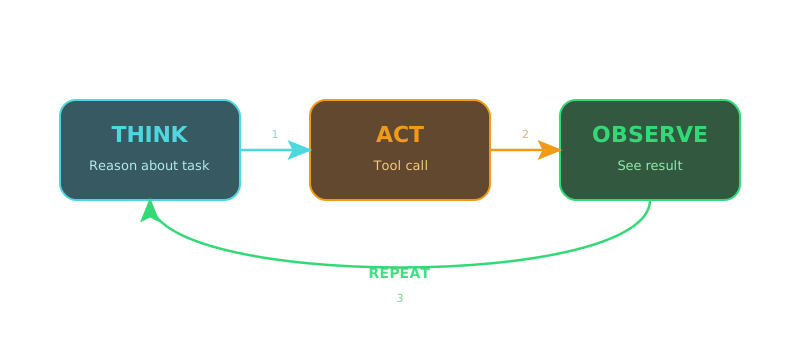
Now let's see how it actually works under the hood.
How Tool Calling Works
Step 1: You send a message + tool definitions to the LLM
// You tell the model: "Here are tools you can use"
const tools = [
  {
    name: "calculator",
    description: "Evaluate math expressions",
    schema: { expression: "string" }
  },
  {
    name: "web_search",
    description: "Search the web",
    schema: { query: "string" }
  }
];
How Tool Calling Works (cont.)
Step 2: Model decides — respond with text OR request a tool call
// User asks: "What is 1523 * 456?"

// Model returns (NOT text — a structured tool call):
{
  "tool_calls": [{
    "name": "calculator",
    "arguments": { "expression": "1523 * 456" }
  }]
}
Step 3: Your code executes the tool, returns the result
Step 4: Model sees the result, decides if it needs more tools or can answer
Tool Calling Flow
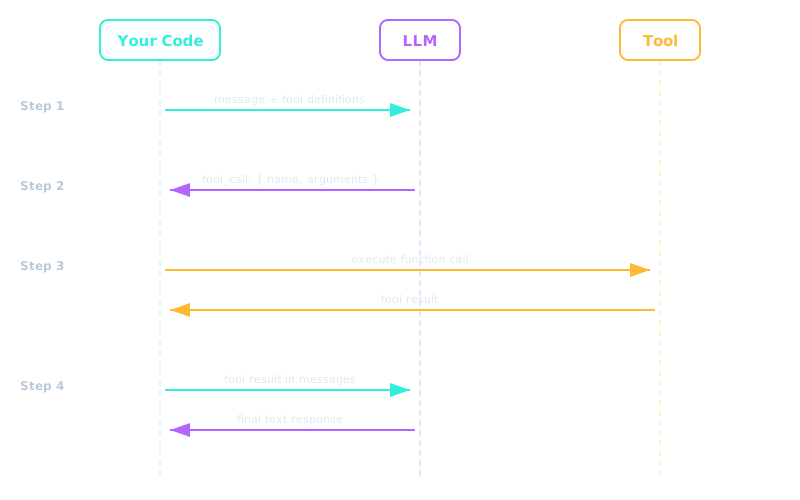
The complete request-response cycle between your code, the LLM, and the tool.
The Agent Loop (Pseudocode)
function runAgent(userMessage, tools):
    messages = [userMessage]

    while true:
        response = llm.call(messages, tools)

        if response.hasToolCalls:
            for each toolCall in response.toolCalls:
                result = execute(toolCall)
                messages.append(result)
        else:
            return response.text   // Final answer!
Part 3
LangChain Fundamentals
Tools, agents, and the execution loop
What is LangChain?
- The dominant agent framework — 90M+ monthly downloads
- Available in Python and JavaScript/TypeScript
- Provides abstractions for models, tools, agents, memory, and more
- We'll use LangChain.js (TypeScript)
Key packages:
langchain               — Main package (createAgent)
@langchain/anthropic    — Claude model integration
@langchain/openai       — OpenAI model integration (alternative)
@langchain/langgraph    — Agent graph execution engine
@langchain/core         — Tool definitions, prompts
@langchain/classic      — Vector stores (in-memory, etc.)
Note: Older tutorials may reference createReactAgent from @langchain/langgraph/prebuilt. This still works but the modern API uses createAgent from langchain.
Installing LangChain
# Core packages
npm install langchain @langchain/anthropic @langchain/openai @langchain/langgraph @langchain/core

# For homework tools
npm install @langchain/tavily          # Web search
npm install @langchain/classic         # In-memory vector store

# Schema validation
npm install zod

# Environment (use ONE of these model providers)
export ANTHROPIC_API_KEY="your-key-here"  # If using Claude
export OPENAI_API_KEY="your-key-here"     # If using OpenAI
export TAVILY_API_KEY="your-key-here"
Your First Tool
import { tool } from "@langchain/core/tools";
import { z } from "zod";

const greetingTool = tool(
  ({ name }) => {
    return `Hello, ${name}! Welcome to BYU.`;
  },
  {
    name: "greeting",
    description: "Greet a person by name",
    schema: z.object({
      name: z.string().describe("The person's name"),
    }),
  }
);
Three parts: Function, name + description, schema (Zod)
Anatomy of a Tool
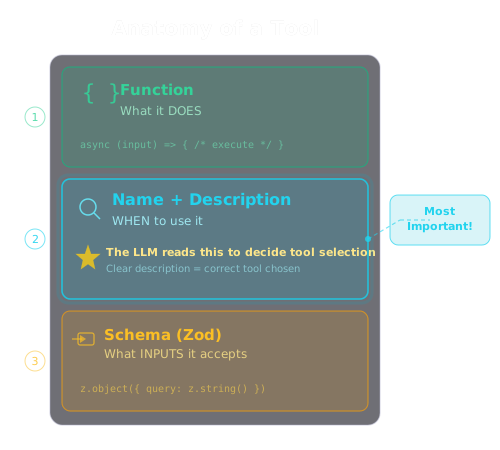
Good vs Bad Tool Descriptions
✗ "Searches the web"

✓ "Search the web for current information that is not
    available in your training data, such as recent events,
    current prices, or real-time data"
✗ "Does math"

✓ "Evaluate mathematical expressions. Use this for any
    arithmetic, percentages, or calculations where
    precision matters"
Think of it as instructions for a coworker: When should they use this tool vs. figure it out themselves?
Another example — a scheduling app:
✗ "Handles scheduling"

✓ "Find available time slots in the user's calendar between
    their existing events. Use when the user needs to schedule
    a new task and you need to know what times are open."
Creating a ReAct Agent
import { ChatAnthropic } from "@langchain/anthropic";
// Or: import { ChatOpenAI } from "@langchain/openai";
import { createAgent } from "langchain";

// 1. Choose your model
const model = new ChatAnthropic({
  model: "claude-sonnet-4-5",
  temperature: 0,
});
// Or: const model = new ChatOpenAI({ model: "gpt-4o", temperature: 0 });

// 2. Define your tools (we'll build real ones next)
const tools = [greetingTool, calculatorTool, searchTool];

// 3. Create the agent
const agent = createAgent({
  model: model,
  tools: tools,
});
That's it. LangChain handles the ReAct loop, tool routing, and state management.
Running the Agent
// Simple invocation
const result = await agent.invoke({
  messages: [{ role: "user", content: "What is 42 * 58?" }],
});

console.log(result.messages[result.messages.length - 1].content);
// → "42 × 58 = 2,436"
What happened behind the scenes:
- Model saw the question + available tools
- Model chose
calculatortool with"42 * 58" - Agent executed the tool → got
2436 - Model saw the result → generated a human-friendly answer
Streaming Agent Output
// Stream for real-time UI updates
const stream = await agent.stream({
  messages: [{ role: "user", content: "What is 42 * 58?" }],
});

for await (const chunk of stream) {
  // See each step as it happens
  console.log("Step:", JSON.stringify(chunk, null, 2));
}
Why stream? In a chatbot UI, users see the agent "thinking" in real time instead of waiting for the final answer.
The LangGraph State Machine
Under the hood, createAgent builds a graph:
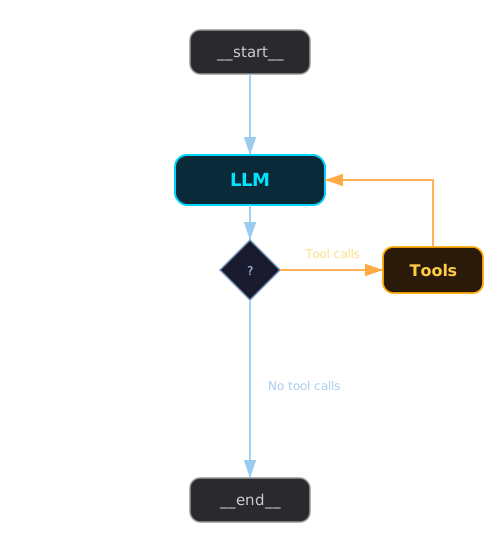
The conditional edge checks: did the model return tool calls? If yes → execute tools → loop back. If no → done.

Part 4
Building Your First Tools
Calculator and web search
Tool 1: Calculator
import { tool } from "@langchain/core/tools";
import { z } from "zod";

const calculator = tool(
  ({ expression }) => {
    try {
      // Safely evaluate mathematical expressions
      const result = Function(
        '"use strict"; return (' + expression + ")"
      )();

      if (!isFinite(result)) {
        return "Error: Result is infinity or NaN";
      }
      return String(result);
    } catch (error) {
      return `Error: ${error.message}`;
    }
  },
  {
    name: "calculator",
    description:
      "Evaluate mathematical expressions. Use this for any " +
      "arithmetic, percentages, or calculations where precision " +
      "matters. Input should be a valid JS math expression " +
      "like '2 + 2' or 'Math.sqrt(16)' or '0.15 * 200'.",
    schema: z.object({
      expression: z.string().describe(
        "A JavaScript math expression to evaluate"
      ),
    }),
  }
);
Calculator: Key Design Decisions
Why Function() instead of eval()?
- Runs in strict mode — but still NOT safe for untrusted input
- No access to enclosing scope variables
- This is a toy for learning. In production, use a proper math parser (e.g.,
mathjs) —Function()can still execute arbitrary JavaScript
Why return strings, not numbers?
- Tools always return strings to the LLM
- The LLM formats the result for the user
Why catch errors?
- Return error messages, don't throw
- The LLM can interpret the error and try again or explain the issue
Tool 2: Web Search (Tavily)
import { TavilySearch } from "@langchain/tavily";
import { tool } from "@langchain/core/tools";
import { z } from "zod";

const webSearch = tool(
  async ({ query }) => {
    const tavily = new TavilySearch({
      maxResults: 3,
    });
    const results = await tavily.invoke({ query });

    // Format results for the LLM
    if (Array.isArray(results)) {
      return results
        .map((r) => `**${r.title}**\n${r.content}\nURL: ${r.url}`)
        .join("\n\n---\n\n");
    }
    return String(results);
  },
  {
    name: "web_search",
    description:
      "Search the web for current information. Use when you " +
      "need up-to-date data not in your training data: news, " +
      "current events, prices, recent releases, etc.",
    schema: z.object({
      query: z.string().describe("The search query"),
    }),
  }
);
Why Tavily?
| Feature | Tavily | Raw Google API |
|---|---|---|
| Designed for | LLM agents | Humans |
| Returns | Structured content + metadata | Links + snippets |
| Relevance | Optimized for AI consumption | Generic ranking |
| Setup | One API key | Complex OAuth |
| Free tier | 1,000 searches/month | Limited |
Tavily is purpose-built for agent tool use — the results are pre-structured for LLMs to consume effectively.
In Practice

Part 5
Important Concepts & Gotchas
Error handling and common pitfalls
Error Handling in Tools
Always catch errors in tools — never throw
Bad — throws, crashes the agent loop:
const badTool = tool(
  ({ expression }) => {
    return eval(expression);  // Could throw!
  },
  { ... }
);
Good — returns error message, agent can adapt:
const goodTool = tool(
  ({ expression }) => {
    try {
      const result = Function(
        '"use strict"; return (' + expression + ')'
      )();
      return String(result);
    } catch (error) {
      return `Error: ${error.message}.
Try a simpler expression.`;
    }
  },
  { ... }
);
Why? The LLM can read the error message and try a different approach.
Common Pitfalls
| Pitfall | Symptom | Fix |
|---|---|---|
| Vague tool descriptions | Agent picks wrong tool | Be specific about WHEN to use each tool |
| No error handling | Agent crashes on bad input | Always try/catch in tools |
| Too many tools | Agent confused, slow | Start with 3-5 tools max |
| No iteration limit | Infinite loops, high cost | Set recursion/iteration limits |
| Forgetting async | Tool hangs or fails | Web/RAG tools must be async |

Part 6
Your Individual Agent Project
Start building your agent
What You're Building
A mini version of your term project — done individually. Practice the full agentic development workflow on your own.
This is a two-part homework spanning Units 7 and 8.
API Keys & Costs
You'll need API keys (free tiers available):
| Service | Free Tier | Sign Up |
|---|---|---|
| Anthropic | $5 credit for new accounts | console.anthropic.com |
| OpenAI (alternative) | $5 credit for new accounts | platform.openai.com |
| Tavily | 1,000 searches/month | tavily.com |
Estimated homework cost: $2–5 total (use claude-haiku-3-5 or gpt-4o-mini to minimize costs)
How You Build This
This is a software development project. Build it the way you've been taught.
Your repo should demonstrate the same infrastructure and process standards as your term project. We will be reviewing your repos — not just whether the chatbot works, but how you built it.
Key packages:
langchain, @langchain/anthropic (or @langchain/openai), @langchain/langgraph, @langchain/core, @langchain/tavily, zod
For Session 2's RAG portion: @langchain/classic and an embeddings provider
What We'll Look For in Your Repo
Same expectations as your term project — smaller scope, individual accountability.
| Rubric Area | What This Means for Your Agent Project |
|---|---|
| PRD & Document-Driven Dev | Brief PRD (what it does, tools, problem it solves). Roadmap. Development driven by documents, not ad-hoc prompting. |
| AI Dev Infrastructure | aiDocs/ with context.md, .gitignore configured, no secrets committed. AI tools can orient from your context file. |
| Phase-by-Phase Implementation | Roadmap with phases checked off. Git history showing incremental progress — not one giant commit. Multi-session workflow. |
| Structured Logging & Debugging | Structured logging (not just console.log). scripts/ folder with test.sh. Proper exit codes. Test-log-fix loops. |
Phase 1 Goals (This Unit)
- Set up your project with proper infrastructure (repo structure,
aiDocs/, PRD, roadmap) - Build and test your first two tools (calculator + web search)
- Create the agent and verify it routes questions to the right tool
- Begin your web UI
- Push your progress with meaningful, incremental commits

Setup Time
Use your development tools to set up your project — this is a good first test of your workflow.
Common blockers:
- API key issues (get them configured now)
- Node.js version problems (need v18+)
Surface these now while we're all in the same room. If you hit setup issues, ask. That's what this time is for.
Before Next Time
Key Takeaways
createAgent handles the ReAct loop