Dev Unit 6 (continued): RAG & Multi-Tool Agents
Adding knowledge and chaining tools
What We'll Cover Today
What You Should Be Able to DO After Today
Today you complete the picture: agents with knowledge, multi-tool reasoning, and memory.
Quick Recap: What We Built Last Session
You now know how to:
- Define tools with
tool()— function + name/description + Zod schema - Create a ReAct agent with
createReactAgentfrom LangChain - Build a calculator tool and a web search tool
- Handle errors in tools (return messages, never throw)
Today: We add a knowledge base (RAG), chain multiple tools together, and complete your homework assignment.
RAG & Embeddings

Part 1
Give your agent a knowledge base
Tool 3: RAG (In-Memory Vector Search)
What is RAG? Retrieval-Augmented Generation
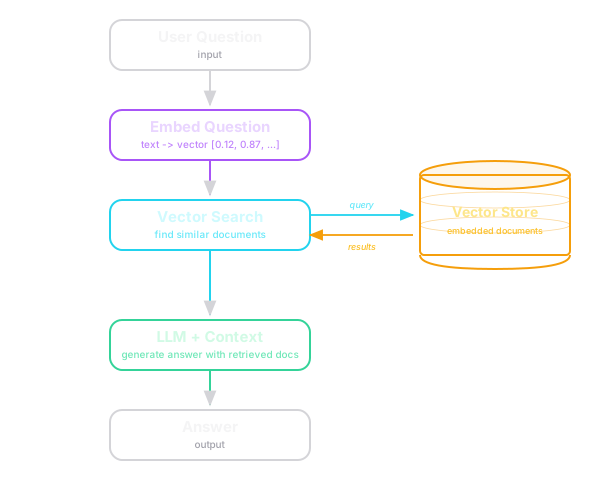
Why? Give the agent access to YOUR documents — company docs, course notes, API references, anything.
What Are Embeddings?

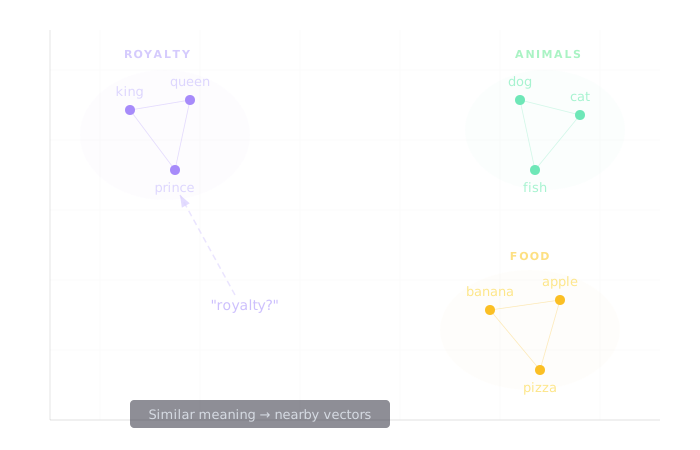
Embeddings convert text into vectors (arrays of numbers) that capture meaning:
Embeddings in Code
"king"    → [0.21, -0.45, 0.89, 0.12, ...]
"queen"   → [0.19, -0.42, 0.91, 0.15, ...]   ← similar!
"banana"  → [0.82, 0.33, -0.11, 0.67, ...]   ← different!
Key insight: Similar meanings → similar vectors → we can search by meaning, not just keywords.
import { OpenAIEmbeddings } from "@langchain/openai";

const embeddings = new OpenAIEmbeddings({
  model: "text-embedding-3-small",  // Fast and cheap
});

const vector = await embeddings.embedQuery("What is photosynthesis?");
// → [0.021, -0.045, 0.089, ...] (1536 numbers)
Note: Anthropic doesn't offer an embeddings model, so you'll need an OpenAI API key for this part regardless of which chat model you use. Alternatively, look into Voyage AI (recommended by Anthropic) or a free local option.
Building the Vector Store
import { MemoryVectorStore } from "@langchain/classic/vectorstores/memory";
import { OpenAIEmbeddings } from "@langchain/openai";

const embeddings = new OpenAIEmbeddings({
  model: "text-embedding-3-small",
});

// Create in-memory vector store
const vectorStore = new MemoryVectorStore(embeddings);

// Add your documents
await vectorStore.addDocuments([
  {
    pageContent: "Our API rate limit is 100 requests per minute...",
    metadata: { source: "api-docs.md", topic: "rate-limits" },
  },
  {
    pageContent: "Authentication uses JWT tokens with 24h expiry...",
    metadata: { source: "auth-docs.md", topic: "authentication" },
  },
  // ... add as many documents as you want
]);
Loading Documents for Your Homework
Option 1: Create a documents.ts file with your content as an array of objects
Option 2: Use LangChain's DirectoryLoader to load files from a docs/ folder:
import { DirectoryLoader } from "langchain/document_loaders/fs/directory";
import { TextLoader } from "langchain/document_loaders/fs/text";

const loader = new DirectoryLoader("./docs", {
  ".txt": (path) => new TextLoader(path),
});
const docs = await loader.load();
await vectorStore.addDocuments(docs);
Either approach works — pick whichever fits your document source.
The RAG Tool
const knowledgeBase = tool(
  async ({ query }) => {
    // Semantic search — finds documents by MEANING
    const results = await vectorStore.similaritySearch(query, 3);

    if (results.length === 0) {
      return "No relevant documents found.";
    }

    return results
      .map((doc, i) =>
        `[${i + 1}] (Source: ${doc.metadata.source})\n${doc.pageContent}`
      )
      .join("\n\n");
  },
  {
    name: "knowledge_base",
    description:
      "Search the documentation knowledge base using semantic " +
      "search. Use this to find information from our docs " +
      "about APIs, authentication, configuration, etc.",
    schema: z.object({
      query: z.string().describe(
        "Natural language query about the documentation"
      ),
    }),
  }
);
RAG: Why In-Memory?
| Approach | Best For | Trade-offs |
|---|---|---|
| In-memory (today) | Prototypes, small datasets (<10K docs) | Fast, no setup; lost on restart |
| Pinecone / Weaviate | Production, large datasets | Persistent, scalable; costs money |
| ChromaDB | Local development | Persistent, free; single machine |
| PostgreSQL + pgvector | If you already use Postgres | Integrated; requires Postgres |
For homework: In-memory is perfect. Load your docs at startup, search them during conversation.
In Practice
Multi-Tool Agents

Part 2
Chaining tools together
Multi-Tool Agent Architecture
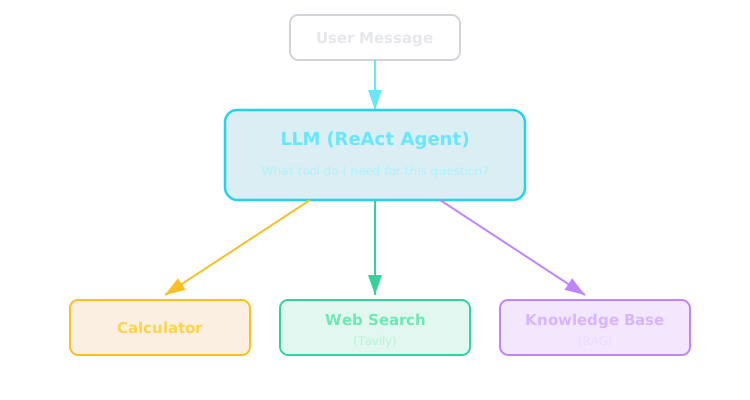
The LLM reads tool descriptions and decides which tool(s) to call for each question.
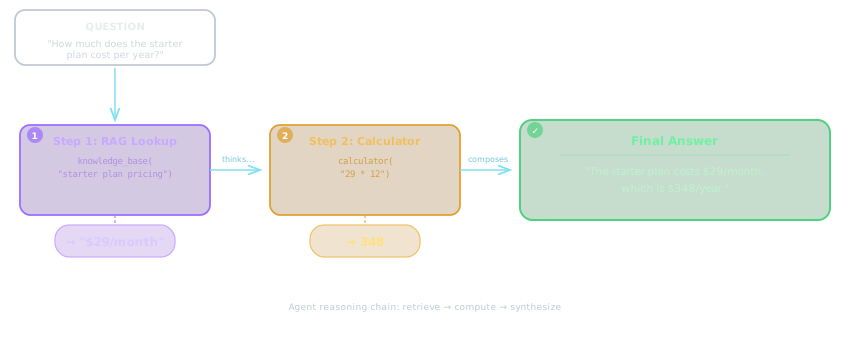
Multi-Tool Reasoning in Action
Question: "How much does the starter plan cost per year?"
Multi-Tool Reasoning: Another Example
A campus event budget app:
Question: "How much would it cost to cater 3 club events this month?"

Step 1: knowledge_base("catering pricing options")
  → "Basic pizza package: $85/event. Sandwich platter: $120/event."

Step 2: calculator("85 * 3")
  → "255"

Final answer: "The basic pizza package for 3 events would be $255.
  The sandwich platter option would be $360 (3 × $120)."
Conversation Memory

Part 3
Multi-turn context
Adding Conversation Memory
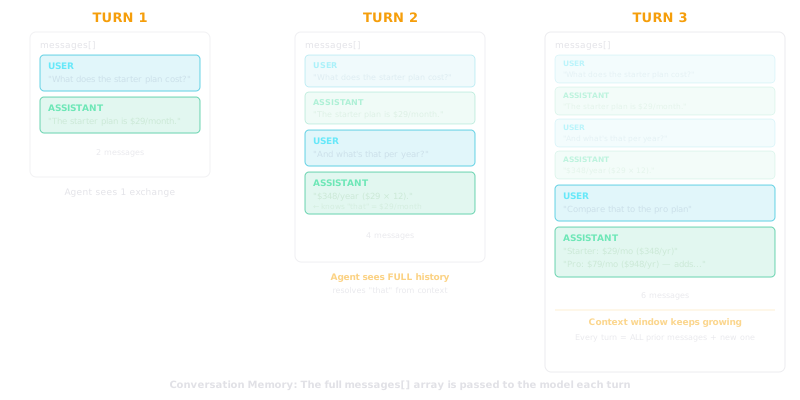
// Maintain message history across turns
let messageHistory = [];

async function chat(userMessage) {
  messageHistory.push({
    role: "user",
    content: userMessage,
  });

  const result = await agent.invoke({
    messages: messageHistory,
  });

  const assistantMessage =
    result.messages[result.messages.length - 1];

  messageHistory.push({
    role: "assistant",
    content: assistantMessage.content,
  });

  return assistantMessage.content;
}

// Multi-turn conversation
await chat("What does the starter plan cost?");
await chat("And what's that per year?");  // Remembers context!
Conversation Memory: Caveats
In Practice

Part 4
Beyond LangChain
Other agent frameworks
Beyond LangChain: Other Agent Frameworks
| Framework | Language | Best For |
|---|---|---|
| LangChain (this course) | Python + JS/TS | Broadest ecosystem, most tutorials |
| Mastra | TypeScript only | TS-native DX, built-in production features |
| CrewAI | Python | Multi-agent teams with defined roles |
| OpenAI Agents SDK | Python | Simple agents, OpenAI-only (vendor locked) |
For this course: We use LangChain (broadest ecosystem). Explore others on your own.
Production Considerations
Part 5
Costs, debugging, security
Token Costs and Iteration Limits
Every iteration = another LLM API call = more tokens = more cost
| Scenario | Typical Iterations | Cost Impact |
|---|---|---|
| Simple calculation | 1-2 | Low |
| Web search + answer | 2-3 | Medium |
| Multi-tool chain | 3-5 | Higher |
| Agent stuck in loop | 10+ | Expensive! |
Control the loop:
const agent = createReactAgent({
  model: new ChatAnthropic({ model: "claude-haiku-3-5" }),
  tools: tools,
});

// Limit iterations when invoking
const result = await agent.invoke(
  { messages },
  { recursionLimit: 10 }  // Prevent infinite loops
);
Security Considerations
From Dev Unit 4 — still applies here:
- Never hardcode API keys — use environment variables
- Validate tool inputs — especially for calculator
- Sanitize user input — prevent prompt injection through tools
- Audit tool outputs — don't blindly trust web search results
// ❌ Dangerous — eval executes arbitrary code
const result = eval(userExpression);

// ❌ Function() is also unsafe for untrusted input (as we noted last session)

// ✅ Use a proper math library in production
import { evaluate } from "mathjs";
const result = evaluate(expression);  // Only does math, nothing else
Troubleshooting: Common Errors (Reference Handout)
| Error | Cause | Fix |
|---|---|---|
API_KEY not set |
Missing env variable | export ANTHROPIC_API_KEY="..." or export OPENAI_API_KEY="sk-..." |
Tool not found |
Typo in tool name | Check tool name matches exactly |
| Agent returns text instead of calling tool | Bad tool description | Make description more specific about WHEN to use |
RateLimitError |
Too many API calls | Add delays, use claude-haiku-3-5, reduce maxResults |
| RAG returns no results | Documents not loaded | Verify addDocuments() was awaited |
TypeError: Cannot read properties |
Forgot async/await |
Web and RAG tools MUST be async |
Your Agent Project — Adding RAG and Finishing Up

Part 6
Your Target by the Deadline
Here's what we're working toward over the next two weeks:
- A working agent with calculator and web search tools
- Repo with
context.md, PRD, and roadmap - A web UI in progress (or at minimum a working terminal interface)
- Incremental git history showing your development process
- Logging that shows which tool was called, arguments passed, and results returned
You have two weeks — focus on getting the agent working first, then layer in the infrastructure.
What to Add Now
Add a RAG tool:
- Choose a document set (project docs, course notes, a library's docs, a company FAQ)
- Create at least 5 documents with meaningful content
- Use OpenAI embeddings (or Voyage AI) + in-memory vector store
- Build a
knowledge_basetool that returns relevant documents with source attribution
Add conversation memory:
- Maintain a message history array across turns
- Pass the full history to the agent on each invocation
- Verify multi-turn conversations work (follow-up questions that reference earlier context)
Complete your web UI — your agent should be usable through a simple chat web page, not just a terminal.
Continue updating your roadmap and committing incrementally as you add these features.
Deliverables
context.md, .gitignore, PRD, roadmap with phases checked off, logging that shows which tool was called, arguments passed, and results returned, incremental git history